<!--
title: Best AI food tracker apps for iPhone (2026)
description: Compare AI food tracker apps for iPhone in 2026 from their own pages. FoodTracker keeps photo estimates editable, macros on screen, and core logging free.
published: 2026-11-22
category: foodtracker
hero: /static/blog/heroes/hero-ai-food-tracker-iphone.png
-->

# Best AI food tracker apps for iPhone (2026)

<p class="blog-lead">Food logging used to mean typing "chicken, grilled, 150 g" into a search box and scrolling past forty versions of chicken. Now you point your phone at the plate and the app takes a guess. The camera part is solved. The interesting question is what the app does with its guess.</p>

The AI food trackers people usually name for iPhone in 2026 are PlateLens, SnapCalorie, Lifesum, Foodvisor, and Yazio. That's the list in PlateLens's own [November 2026 comparison](https://platelens.app/blog/best-ai-calorie-tracking-app-november-2026) and in TrackAI's [October 2026 iPhone roundup](https://trackaiapp.com/blog/best-ai-calorie-counter-apps-iphone-2026). We read each one from its own public pages, then say where our app, [FoodTracker](/foodtracker), fits. This isn't a scored ranking, and we didn't run a lab study, so we won't pretend we did.

## The photo is the easy part

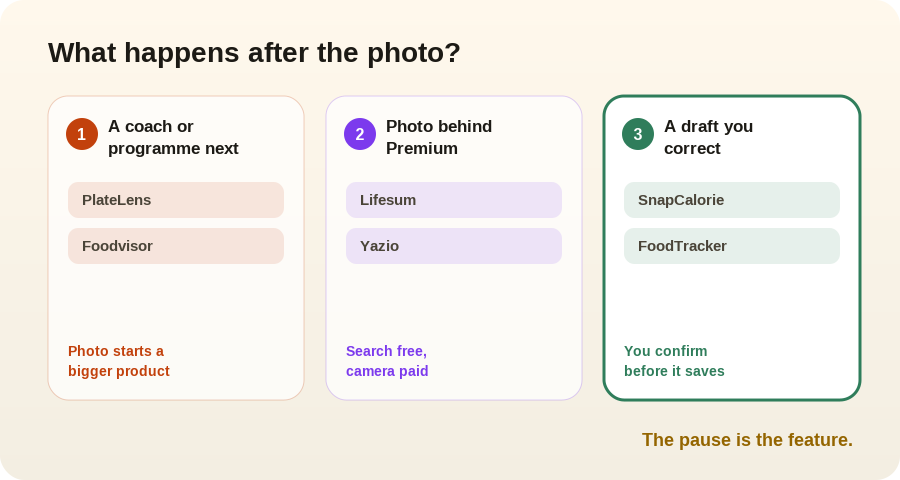
Every app below can turn a picture of lunch into calories and macros. Where they really differ is the step after that. Some hand you to a coach or a programme. Some keep the camera behind Premium while search stays free. Some show you the estimate and wait for you to fix it before anything is saved.

**That pause matters more than any badge that says "best."** A photo estimate is a draft. The app that treats it like one is the app whose numbers you'll still trust in week six.

<figure class="blog-figure blog-figure--chart">
<img src="/static/blog/heroes/chart-after-the-photo.svg" alt="Diagram of three kinds of AI food tracker. PlateLens and Foodvisor lead from the photo to a coach or programme. Lifesum and Yazio keep the photo behind Premium while search stays free. SnapCalorie and FoodTracker treat the photo as a draft you correct before it saves." loading="lazy" width="900" height="480">
<figcaption>Same camera, three different deals.</figcaption>
</figure>

A good AI food tracker does four jobs. It proposes foods and amounts from a photo, a voice note, or some typed words. It shows calories and macros. It lets you correct the draft. It saves the corrected row into a day you can reopen later. Miss any one of those and you have a chatbot, a meal plan, or a one-shot scanner, not a food log.

Barcodes and typed search still matter when the package has a label, and none of this replaces a kitchen scale when the number has to be exact. Our note on [correcting an AI calorie estimate](/blog/correct-ai-calorie-estimate-2026/) goes into that.

The idea is catching on elsewhere too. [Calories Club wrote in November 2026](https://caloriesclub.app/en/blog/calories-club-labels-every-food-on-your-plate/) that a meal photo now pins a calorie label on each food it counted, so you fix the one portion that looks wrong instead of trusting a single total. Same principle: the photo proposes, the person decides.

## PlateLens: everything, plus a coach

[PlateLens on the App Store](https://apps.apple.com/us/app/platelens-ai-calorie-counter/id6758055385) logs by photo, voice, text, or barcode, and adds an AI coach and 3D body scans. The listing says you can review ingredients and adjust portions before you treat a meal as done, and its own comparison names a "Fix it" step that takes corrections in plain words. That page also publishes accuracy figures for PlateLens and its rivals. We don't repeat them here: a vendor's own table is their measurement, not ours.

The free plan covers calorie and macro tracking with daily allowances for AI logging and coaching. Premium raises those and adds deeper nutrient views. PlateLens also lists Android, Apple Watch, and web from one account. **Pick it if you want the photo to be the front door to a whole programme.**

## SnapCalorie: snap or speak, then edit

[SnapCalorie's App Store listing](https://apps.apple.com/us/app/snapcalorie-ai-calorie-counter/id1574239307) says you take a photo or dictate a voice note, then get calories, macros, and a long list of micronutrients. It claims camera-based portion measurement, USDA-backed food data, and instant edits after the prediction. The site says core features stay free without a card, and the listing shows Premium purchases.

It's a photo-first diary with no coach thread and no social feed. If depth sensors and a visual timeline are what you're after, that's its deal.

## Lifesum and Yazio: search free, camera paid

[Lifesum's App Store listing](https://apps.apple.com/us/app/lifesum-ai-calorie-counter/id286906691) markets photo, voice, text, and barcode logging. Its help pages put **AI Tracking** on Premium, while search, barcode, and Quick Track stay free for everyone. Premium also unlocks plans and Life Score detail, and Lifesum is a full wellness stack with recipes, water, and device sync. Prices differ between its upgrade page and the App Store, so trust the one in your store.

[Yazio's help centre](https://help.yazio.com/hc/en-us/articles/39137901903889-What-is-the-AI-Calorie-Tracking-Feature-and-how-does-it-work) says photo tracking used to be free for everyone and now sits in Yazio Pro. It calls the result a rough estimate you should review and edit, which we appreciate. It's an honest sentence that more apps should print. Yazio remains a diary-first counter with a big food database. The camera is one door into it.

## Foodvisor: a photo that starts a programme

[Foodvisor's App Store listing](https://apps.apple.com/us/app/foodvisor-ai-calorie-counter/id1064020872) leads with a five-second photo log, plus voice, search, and barcode. Premium adds full micronutrient analysis, a personal programme, workouts, fasting programmes, and a habit loop it calls the "seed". It needs iOS 17 and an A12 iPhone or newer. Choose it when you want coaching after the photo. Choose something thinner when you just want the log.

<blockquote class="blog-pullquote"><p>A photo estimate is a draft. Treat it like one and your numbers stay honest.</p></blockquote>

## Where FoodTracker fits, and what it leaves out

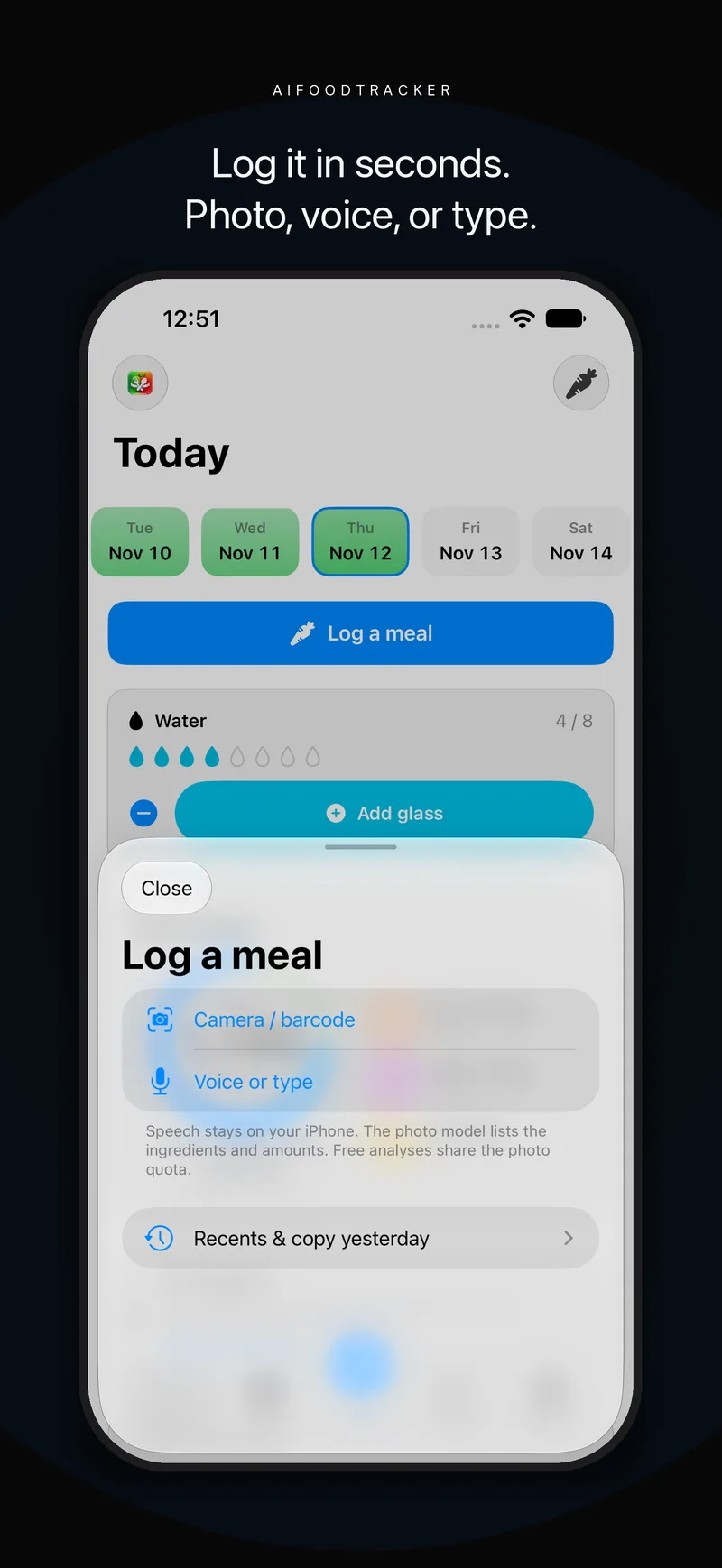
We built [FoodTracker](/foodtracker) for the third column of that diagram. You log with a photo, a barcode, or search on iPhone or iPad, check the portions, and only then does the row save. Macros stay on screen while you do it.

<figure class="blog-figure blog-figure--phone">
<img src="/static/blog/heroes/foodtracker-log-a-meal.webp" alt="FoodTracker on iPhone: the Log a meal sheet with Camera or barcode, Voice or type, and Recents and copy yesterday" loading="lazy" width="800" height="1738">
<figcaption>Log a meal: camera or barcode, voice or typing, or copy yesterday.</figcaption>
</figure>

Core logging stays free: unlimited manual entries, barcode, weight history, the fasting timer, and iCloud sync. The free tier also includes 20 free AI photo analyses in total (up to 3 per UTC day). Premium is billed by Apple at **$2.99/mo or $19.99/yr**, the prices on our English product page. It unlocks unlimited AI photo analysis, a daily macro summary notification, CSV export, or the option to use your own OpenAI key. Existing subscribers keep their price.

Now what we don't do. There's no coach chatbot, no social feed, and no Android app. FoodTracker isn't in the vendor accuracy tables above, and we don't publish a lab error rate for our photo estimates. A confirmed estimate is still an estimate until you weigh the food or read a label. If you'd rather have MyFitnessPal-style database depth and skip the camera question entirely, start with our [MyFitnessPal alternative](/blog/myfitnesspal-alternatives-2026/) note.

## Decide in one minute

Want a coach and body tools? Start with PlateLens or Foodvisor and read their Premium lines. Want photo or voice, then edit? SnapCalorie fits. Happy to pay for the camera only once free search has proved itself? Lifesum and Yazio work that way.

**And if you want a fast iPhone log where the photo stays a draft until you say so, that's FoodTracker.**

<aside class="blog-cta">
<p><strong>FoodTracker is on iPhone and iPad.</strong> Log with a photo, barcode, or search, confirm the portions, and keep your macros in view. Core logging is free.</p>
<p class="blog-cta__actions"><a class="blog-cta__button" href="/go/foodtracker">Get FoodTracker on the App Store</a> <a href="/foodtracker">See how FoodTracker works</a></p>
</aside>

## References

- [PlateLens on the App Store — photo, voice, text, barcode logging.](https://apps.apple.com/us/app/platelens-ai-calorie-counter/id6758055385)
- [PlateLens — Best AI calorie tracking app, November 2026.](https://platelens.app/blog/best-ai-calorie-tracking-app-november-2026)
- [TrackAI — Best AI calorie counter apps for iPhone, 2026.](https://trackaiapp.com/blog/best-ai-calorie-counter-apps-iphone-2026)
- [SnapCalorie on the App Store — photo and voice nutrition logging.](https://apps.apple.com/us/app/snapcalorie-ai-calorie-counter/id1574239307)
- [Lifesum on the App Store — AI calorie counter and Premium AI Tracking.](https://apps.apple.com/us/app/lifesum-ai-calorie-counter/id286906691)
- [Foodvisor on the App Store — AI calorie counter and Premium programme.](https://apps.apple.com/us/app/foodvisor-ai-calorie-counter/id1064020872)
- [Yazio Help — AI calorie tracking from a meal photo (Pro).](https://help.yazio.com/hc/en-us/articles/39137901903889-What-is-the-AI-Calorie-Tracking-Feature-and-how-does-it-work)
- [Calories Club — meal photo labels every food (November 2026).](https://caloriesclub.app/en/blog/calories-club-labels-every-food-on-your-plate/)
- [Correct an AI calorie estimate before you save.](/blog/correct-ai-calorie-estimate-2026/)
- [MyFitnessPal alternative for iPhone.](/blog/myfitnesspal-alternatives-2026/)